Adding a Touch of Humanity: Integrating Elliana into Your Workflow
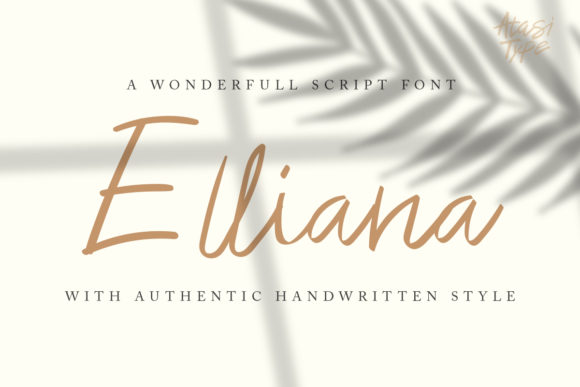
Digital design is often a world of sharp vectors and mathematically perfect curves. For projects that demand a sense of authenticity, warmth, or direct human connection, this precision can sometimes feel sterile. Elliana exists as a bridge between the digital workspace and the organic feel of handmade art. It is a natural handwritten script created with a brush pen, carefully digitized to retain every nuance of its calligraphic origin. For professionals and creators, it’s more than just a font; it's a strategic asset that introduces a specific, emotive quality into a process otherwise dominated by grids and pixels.
The Role of Authentic Scripts in Modern Projects
In any creative or communication workflow, the selection of typefaces is a foundational decision, setting the tone before colors, images, or layout are finalized. Using a standard sans-serif font communicates efficiency and modernity, while a classic serif suggests authority and tradition. Elliana occupies a distinct space. It conveys personality, approachability, and craftsmanship. Its integration into your process should therefore be a deliberate choice, made when your project goals include creating a personal touch, evoking handmade quality, or establishing a more intimate dialogue with your audience.
Think of the planning phase for a new brand identity for a boutique bakery, the layout of a heartfelt wedding invitation suite, or the design of a promotional campaign for an independent craft workshop. In these contexts, the visual tone is paramount. Elliana can serve as the primary voice or a supportive accent. Introducing it early in the conceptual stage allows you to build the rest of your visual assets—photography style, color palette, supporting graphics—around its organic rhythm, ensuring cohesive outcomes.
Compatibility and Preparation
Before integrating Elliana into an active project, a few practical considerations ensure smooth implementation. First, verify compatibility with your core software. Elliana, like any quality font, will work seamlessly in major design applications like Adobe Creative Suite, Affinity products, and Canva. Ensure your team or collaborators have the correct licensing and font files to maintain consistency.
Second, understand its characteristics. Being a true brush script, Elliana has a variable stroke weight and natural letter connections. Review its glyph set and alternate characters if available. Spend time experimenting with it in a blank document. Test its readability at different sizes and observe how its flowing style interacts with other fonts you commonly pair with. This preparatory step prevents workflow interruptions later when you’re deep into layout work, allowing you to use the font confidently and efficiently.
Practical Implementation Across Diverse Use Cases
The utility of Elliana is defined by the need for a handwritten aesthetic. Its application is not limited to a single industry or medium. Here are concrete examples of how it fits into various professional workflows.
Branding and Marketing Materials
For entrepreneurs and small business owners, branding is an ongoing process of communication. Elliana can be implemented as a signature element. Use it for the logo of a personal consultancy, the taglines on website hero sections, or the highlighted quotes in social media graphics. It instantly personalizes corporate messages. In marketing campaigns, it can be employed in email headers, promotional flyers, or limited-time offer announcements to make them feel special and direct, as if handwritten by the business owner themselves. This breaks through the noise of generic digital advertising.
Publication and Editorial Design
Bloggers, publishers, and educators often seek to create a more engaging reading experience. Within longer texts, Elliana is best used sparingly for maximum impact. Implement it as a stylized drop cap to open a key article, for pull quotes that emphasize important insights, or for section headers in a digital magazine or course workbook. This draws the reader’s eye and adds an element of curated artistry to the layout. It interacts harmoniously with body text fonts, providing visual hierarchy without disrupting readability.
Personal Projects and Creative Endeavors
For hobbyists and freelancers working on personal passion projects, Elliana offers a tool to elevate output without requiring manual calligraphy skills. Integrate it into the design of custom greeting cards, event posters for a community group, or labels for homemade products. The workflow here is often more fluid: the font can be applied during the final design phase after the core content and imagery are settled, adding that final layer of polish and personal signature.
Organizing a Workflow with Script Fonts
Successfully using a distinctive font like Elliana requires attention to organization and consistency. Here are workflow-oriented tips to maintain quality control.
Establish clear guidelines within your project or brand system. Define exactly where Elliana should and should not be used. For instance: “Use Elliana for all main headlines on the website and for handwritten-style annotations in illustrations. Do not use it for body text or numerical data tables.” This prevents arbitrary use and ensures the font retains its special impact.
Create reusable templates. If you find yourself frequently designing social media posts with Elliana quotes, save a template file with the font pre-set in your chosen size and color. This drastically improves efficiency for recurring tasks. Similarly, if you’re producing a series of webinar slides, having a master slide with Elliana styled for the title means you can execute quickly while guaranteeing visual consistency across all sessions.
Pairing and Integration with Other Assets
A font never works alone. Elliana’s effectiveness is amplified or diminished by what surrounds it. During the execution phase of a design, consider its interaction with other elements.
- With Other Typefaces: Pair Elliana with simple, neutral sans-serif fonts for body text. The contrast will make the script stand out beautifully while ensuring the overall composition remains clean and legible.
- With Imagery: Elliana complements photography with a natural, textured, or warm feel. It can be overlaid carefully on images in promotional materials, but always ensure sufficient contrast for readability.
- With Color: Its brush-pen nature often works best with solid, rich colors or subtle neutrals. Avoid placing it on overly busy or patterned backgrounds which can disrupt its elegant flow.
Long-Term Value and Outcome
Integrating a specialized tool like Elliana into your toolkit isn't about a one-off project; it's about expanding your capacity for expression. Over the long term, having access to such a font means you have a ready-made solution for whenever a project brief calls for “authentic,” “personal,” or “crafted.” It becomes a part of your resource library, saving you the time and cost of commissioning custom handwriting for every applicable project.
The ultimate outcome of using Elliana is enhanced communication. Whether in a business context aiming to build customer trust through a humanized brand, or a personal project meant to convey sincere emotion, this font provides a vector-based efficiency while delivering an analogue soul. It allows professionals to execute projects with the polish of digital design, imbued with the warmth of a human hand, streamlining the process from concept to final product.
By understanding its role, preparing for its use, and implementing it with thoughtful guidelines, you can seamlessly weave the distinctive character of Elliana into your creative and professional workflows, achieving outcomes that resonate on a more personal level.